As you are probably aware CSS3 introduces gradient backgrounds allowing some quite creative designs.
However, I’ve been bitten by an interesting quirk when using transparency in gradients. You’d expect that to create a gradient which fades out from a certain colour you’d just use:
background: linear-gradient(top,#FFFFFF 0%,transparent 100%);
See Example 2 for a working demo.
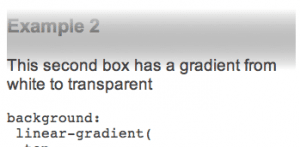
The effect is not as desired as browsers do not treat the value [transparent] as you might intuitively expect. The CSS3 colour spec states that [transparent] can be considered a shorthand for transparent black, rgba(0,0,0,0).
Therefore the browsers are actually fading from white to black independently to fading from opaque to transparent. If you are not aware of this then it’s easy to end up with the ugly grey in the middle of your gradient. The CSS3 Images spec (Last Call Working Draft as of 11th Feb 2012) shows how this should not be the case. At present only Opera appears to use premultiplied values and behave correctly, fading out without going via black.
Update: IE10 (the first version of IE to support gradients) also behaves correctly for this. End Update
Workaround
Until the browsers support the correct implementation the simple (obvious) workaround is to resort to rgba. This isn’t too much of a drawback as rgba is supported in all the browsers that support gradient backgrounds. You just need to remember that the red,green and blue values are the same in both stops and the alpha value changes from 1 to 0.
background: linear-gradient(top,rgba(255,255,255,1) 0%,rgba(255,255,255,0) 100%);
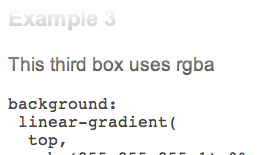
See example 3 on the demo page for a live example